Information

Newsletter March 2009


Welcome to the March newsletter.

Your newsletter will be focussing on the practical issues of photography for the community photographer.

We welcome your raising questions and having responses published. It is intended that this newsletter, shared by a growing network of photographers, will allow you to learn the skills and practical applications for creative photography from myself and others on the network.

Many who are members of the network have attended our short courses, community training sessions and workshops while others have become involved from attending the FREE Seminars at the local Library.

Your comments, questions or articles are always welcomed ... thank you


Local Photographers' Email Network

Are you currently a member of our email network receiving these Newsletters each month and advice of library seminars and discussion groups? If you would like to be included please

email


PhotoTip - Rule of Thirds

The idea is simple:

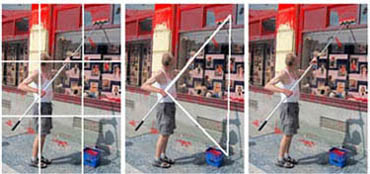
When you look through your viewfinder, imagine a tic-tac-toe grid that divides the image into thirds from top to bottom and left to right. You want to place your subject on or close to one of the four intersections rather than in the center.  This photo does a nice job of that...


Notice the three quarter grid set up on the image to the left. See how the man is lined up perfectly on the left line? Notice, also, how this image has strong points of interest in both the top right and bottom right sections -- it creates an almost visible triangle that keeps the eye of the viewer traveling in the picture (another good compositional element). 


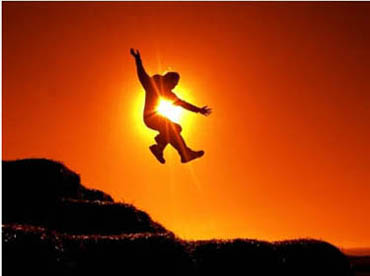
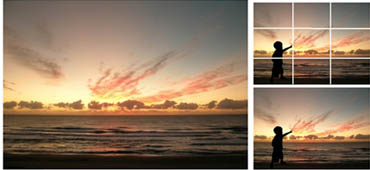
See if we can't improve the sunset image using the Rule of Thirds , which we just talked about with the first picture...

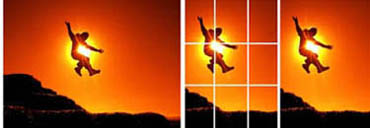
This shot has perfect timing and good stop action. The only thing I would suggest to make this a stronger image would be to take the subject out of the center and use the Rule of Thirds . This can be done horizontally or vertically, but in this case I think the action of the person's body lends itself more to the vertical format. What do you think. Is there something to be learned from this?

Maybe this could be the subject of your critique image for next month's seminar/Forum? One thirds composition - how you improved one of your images?


Sunsets must be one of those things that most people love to shoot. I know I take my share of them. There is something so magical and inspiring about sunsets -- like a snow flake, no two are alike and they change by the moment.

They can be hard to resist. But with so many of us shooting sunsets, you'll have to make a special effort to capture images that set your sunsets apart from others. How? One way is to include "supporting elements" that are well-placed (hint -- think about using the Rule of Thirds ).

Notice in the shot above how adding the silhouette of the little boy (with his forefinger pointing right on the one-third line) dramatically changes the dynamic interest of this sunset.

Suddenly we have human interest -- and this shot goes from being another 'nice' sunset to being a lifestyle shot you could hang on the wall in the family room.


Seminars in the Library

Regular Seminars/Discusion Groups on digital photography are held on the third Thursday of every month at the Everton Park Library from 6-8pm. These are FREE and are part of our studio community program.

The next Seminar /Discussion Group will be held on Thursday 16th April.

The Seminar (6-7pm) will be a repeat of the well received capturing the digital image (if you have already attended this seminar last year you are always most welcome to join us at 7pm for the discussion group
(7-8pm)

The April discussion will be on creative aspects of your photography - how to get more impact into your images!

Please email me you image (2-3Mb if you would like it included in an anonomous critique on the night)

Alternatively we can have a demonstration of photoshop and NERO for adjusting your images. Please contact me if you are interested.

Please phone the librarian on 07 3403 7400 to confirm your attendance as seating is limited.


Seminars, Short Courses and Workshops

Our studio/ field training courses and workshops are offered to assist you to learn the basics of digital photography and by better understanding become more competent and creative. You will marvel at the improvement of your images and be encouraged by your newfound skills.

Course and Workshop information can be found on our

workshop page

Next Short Course (last Sunday of the month)

26th April

Next Workshop (second Sunday of the month)

10th May

Make your booking soon as numbers are limited

enrol now!


Image adjustment software

Many have asked about the available software for image adjustment. I have listed a few links below which will give you comparisons to help you decide with software best suits your needs. Personally I use Adobe Photoshop which tends to be the industry standard. However it is probably far too advanced for your general needs.

Photoshop Elements. If you are serious about image adjustment on your computer and you may want to use Photoshop later on, my advice is to go with the industry standard and get a copy of PS Elements. Any 'flying time' invested (and this may be considerable) will allow you to have skills to upgrade to Photoshop at a later date.

If your needs are for the occasional adjustment to images look at ACDC, NERO or Paintshop.

ACDC is a file management software with many advantages over MS Explorer and has image editing capability. It will also manage your library of images in a database with references for easy location.

Nero 9 likewise has a fundamental image editing capability and also gives you CD and DVD cutting software, video rendering, audio wave editing. The german software is superb and has been used for my studio work for almost 20 years.

Paint Shop Pro is a well respected alternative image editing software and is similar to Photoshop.

And there are others if you search Google

Suggest you look over the list and bring any questions to the discussion group on the 19th February.