Which File Format is best to Use?
Most modern digital cameras give you a choice of file formats when saving your image. It’s very useful to understand the benefits (and disadvantages) of each file format so you can decide which file format best suits your needs.
Why are there different file formats?
A standard photo taken with a 5 megapixel camera has 5 million individual pixels, or pieces of information that comprise the image (for example, dots on your computer screen). Each of those pieces needs to store a red, green and blue colour value so the colour of the pixel can be recreated by a computer or printer. Each colour value records the strength of that colour on a scale from 1 (black) to 256 (white).
This is a lot of information! Each pixel needs three bytes to store the three colour values, and there are 5 million pixels. A quick calculation gives 5 million pixels x 3 colours at around 15 million bytes, or 15 Megabytes (Mb).
If each image takes 15 Megabytes of storage, you will need 1 Gigabyte (Gb) to store approximately 66 photos on your 1 Gb memory card! File formats used to save images compress the image down to a smaller, more manageable, size. JPG files are about one-tenth the size of the TIFF file.
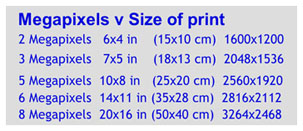
Some relevant facts regarding camera Megapixel capture and pixels captured by your camera can be seen in the following chart.
Now to discuss further the different formats used in the photography industry to save digital files.
JPEG: The name "JPEG" stands for Joint Photographic Experts Group, the name of the committee that created the JPEG standard and also other still picture coding standards. The original JPEG group was organized in 1986 and the first JPEG standard was approved in September 1992.
The JPEG/JPG compression algorithm is at its best on photographs and paintings of realistic scenes with smooth variations of tone and color. For web usage, where the amount of data used for an image is important, JPEG is very popular. JPEG/Exif is also the most common format saved by digital cameras.
On the other hand, JPEG may not be as well suited for line drawings and other textual or iconic graphics, where the sharp contrasts between adjacent pixels can cause noticeable artifacts. Such images may be better saved in a lossless graphics format such as TIFF, GIF, PNG, or a raw image format.(RAW).
As the typical use of JPEG is a lossy compression method (replicates similar image information), which somewhat reduces the image fidelity, it should NOT be used where the exact reproduction of the data is required (such as some scientific and medical imaging applications and certain technical image processing work).
JPEG is also not well suited to files that will undergo multiple edits, as some image quality will usually be lost each time the image is decompressed and recompressed, particularly if the image is cropped or shifted, or if encoding parameters are changed To avoid this, an image that is being modified or may be modified in the future can be saved in a lossless format, with a copy exported as JPEG for distribution.
 You can specify the amount of compression with JPEG images. Your camera will usually have a quality setting – low, medium or high.
 Low quality increases the JPEG com-pression, and although your images will be smaller, they won’t look at good.
Uncompressed TIFF: TIFF is another file format popular because while it still compresses the image, it does so in a way to ensure that the full image can always be restored. There’s no loss of image quality. It works in the same way as ZIP files on a computer. They are compressed, but you can always get the original file back.
RAW: Images stored in RAW format are exactly what the camera ‘sees’ (negative). There is no processing done by the camera before the image is saved. This is one of the major advantages of RAW.
You will recall from above, that each colour value strength is stored on a scale from 1 to 256. Modern cameras can actually detect more than 256 levels of strength. But since the TIFF and JPEG formats don’t allow more than that number, the camera throws the extra information away.
However, the RAW format saves these extra strength levels and this gives a better image with more contrast levels.
There is another benefit of the RAW image. The camera does not correct for exposure or white balance before it saves in RAW format. This means that you have ultimate control in manipulating the image in a photo editing program so your image looks exactly how you want it to look.
All these advantages come at a cost. RAW images do not use any compression so they are large files and take a long time to store and copy. Also
- there is no single RAW standard for all cameras, so you will usually need to use your camera manufacturer’s software to read the RAW file. Photoshop and Lightroom will generally read all types of RAW images.
Which format should you use?
While TIFF and RAW do give you superior images, you may not consider the hassle of much larger file sizes are worth it unless
you have a really high end camera and need to produce really large prints or you are in a difficult lighting situation.
However there is a down side. The images take longer to save and you need to purchase larger (and more expensive) memory cards; a larger hard drive; and more CDs/DVDs to back up images.
The JPEG format is the most popular as it does provide a much smaller image size without losing a lot of quality and is generally the choice of not only amateur and para-professionals but also many professionals.
I trust this has answered the many questions some of you have been asking. Please contact me if there are any further queries.
File format and saving
will be discussed at the October Seminar