Do something, anything, to start using your new camera.
Recently some members of our community who had brought brand-new cameras found they did not really know how to use them when they were confronted with taking images while out and about with others on a recent photography workshop.
So while the others in the group were having a great time photographing a variety of subjects, they were combing through their user manual, with a look of total frustration on their faces.
You can understand why they was so upset. They were surrounded by great photo opportunities and they could not figure out why their lens would not focus and which setting they needed to change to focus on the main subject or to get the depth of field correct. Others could not fully comprehend how the relationships and settings for aperture and shutter speed could be used in relation to ISO settings while using their cameras.
This is an increasingly common problem. Prices on sophisticated cameras are much lower than they used to be and as a result people – especially people looking forward to taking photos on an upcoming holiday or at a special event – tend to buy much more complicated equipment than they have been using or might have been intending to use.
If this is you and if you feel that ……
- you have bought "more camera” than you can handle
- you are being somewhat intimidated by all the bells and whistles that got you excited about your camera in the first place.
- you know how to use your camera but your pictures still are not turning out the way you'd like…… here are a few suggestions.
Do something – anything – to start the learning process: Thanks to digital photography (and the instant feedback you get on the back of your screen), you can learn in one week what it used to take photographers years of trial and error to figure out.
That said, you cannot just pull your camera out of the box and expect a perfect photo on the first try. Setting up a Facebook account was not the easiest thing to do (if you have tried). Neither was programming your DVD player - but you did it. Do not give up frustrated – you WILL master your camera. Do not be too hard on yourself – practice makes perfect and above all, patience IS a virtue.
Accept the fact that there is going to be a learning curve and you have to start somewhere… so get started. (Getting started is always the hardest part.) Right now, just learn something – anything – about your camera and become encouraged and confident enough to move forward.
Don't go it alone: My guess is that if the community people mentioned above had checked out their cameras at home, they still would have been frustrated. Paging through a camera manual is no fun. Shooting with other people, however is…..
- attend one of my community seminars or workshops or have an outing in your own community.
- read some of the past newsletters and TIPs for Digital photographers which will set you well on your way. You can request access by emailing me.
- You can also do some web (Google) searches for the issues that concern you – there is a wealth of information out there that will help you.
Set it and forget it: Consider putting your camera in “auto” or "program” mode and leaving it there. You can photograph great images using these “auto” settings and meanwhile refer questions that might arise either to a group, friend or Google. Your life as a photographer will be a lot more fun and rewarding from your efforts in being a good creative photographer.
- Composition and good lighting are the most important elements of any photograph. A technically perfect image that is not interesting to look at is a waste of your time and creative ability.
- Work on composition and lighting first. Then, when you feel that you have mastered those things, start to play with your camera's "bells and whistles".

Images from recent Community Group Photo Workshop.
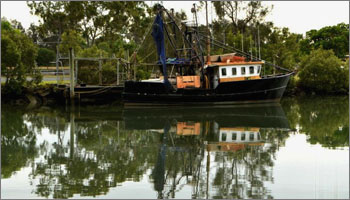
Trawler in Cabbage Tree Creek by Emma Daniells.
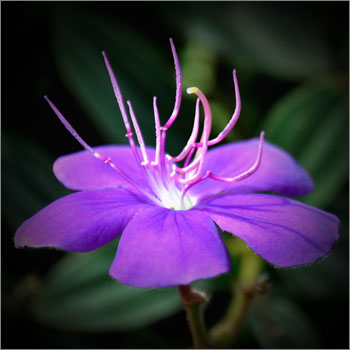
Flower at the Sandgate Wetlands byLouise Jones.

Coastline Sunset with foreground silhouetted at Redcliffe by Lorrie Christie.

Pelicans at Sandgate by Wendy Birnie.
Will you be joining a group for a rewarding photography workshop and experience next month?
These Community Photography Workshops are an opportunity for you to meet similarly interested community photographers and learn new ideas and gain experience in creatitive photography as you enjoy yourself on a local outing.
Do you have other commitments on the day - or you live in another location and would like to be involved?
Everyone can be involved in our community workshops – irrespective of your global location.
I am happy to assist you in arranging similar Group Workshops in your local area. All you need is someone to take the lead and arrange a local place of interest. I will do the initial communication for you in liaison with your selected leader. Any additional local photographers in your area can be added to my email network list to assist you in the task.
This way you can benefit from our community seminars and workshops and have your images presented at the Seminar for discussion.
You also have the option of having your images, feedback and experiences included in my monthly newsletter.
Please contact me if you are interested. This service is FREE without obligation and is offered as a community service for encouraging more people in becoming active in pursuing their photography interest with others in their local communities.
Enjoy your photography.
When autofocus fails - what causes it and how do you manage the problem.
Autofocus was developed during the 1970s to 1980s and revolutionised the way people used their cameras. These days we tend to take autofocus for granted - until it doesn’t work!
While using your camera you may have experienced the lens “hunting” without focusing after you compose your image, half depress the shutter button to focus and then fully depress the shutter to expose your image. After you take the image you find that the background, or foreground, is in focus but the subject may not be focussed. This can be very annoying! Refer to past Newsletter September 2012 for more details.
Nothing is in focus in yor image: This is probably caused by camera shake and is not an autofocus problem. If your photo was taken at night, or indoors and the whole image is blurry, then the camera probably moved while the shutter was open.
The camera may have used a longer shutter speed ( the shutter open for longer time) when there is not much light around. When the shutter is open for longer times, small movements of the camera (and sometimes the subject) can cause the whole image to become blurry. Even the small movements from releasing your finger from the shutter button, or your breathing, can cause this overall movement in the image.
Generally you should use a shutter speed that is equal to the focal length of your lens as a guide. For example, if you are using a standard 50mm lens (or zoom lens setting) a shutter of 1/50 or 1/60 sec should keep your camera steady enough to avoid hand shake. Similarly, if you use a 500mm lens or zoom setting a shutter speed of 1/500 sec should suffice.
If your available light requires you to use a shutter speed longer than 1/30 or 1/15 sec and slower, you are wise to use a tripod. See past newsletter October 2011 for details on using a tripod.
More about this next month for both "point and shoot", digital compact and SLR and DSLR cameras.