|
Digital Photographers' Newsletter
OCTOBER 2013 Edition
This month's summary
(items are now hot linked from summary for convenience) |
Editing images Using Photoshop Elements.
GIMPShop, discussed last month, may be regarded as a ‘free’ Photoshop but some readers find some difficulty in coming to grips with its learning curve. It is designed to incorporate many of the filters, tools, and photographic effects that you get from Photoshop and Photoshop Elements. Like any new software you will need to invest your time in learning how to properly use it. Initally, you may well find this laborous and frustrating.
It can sometimes be worthwhile buying a commercial software which has developed over a period of time and been modified from experience and user feedback.
Photoshop Elements is Adobe's photo-editing software for amateur photographers, digital imaging enthusiasts, and small business users. As the name implies, Photoshop Elements is built around core elements of Adobe Photoshop, excluding some advanced, professional-level features and adding unique features for photo-hobbyists. It includes a fully featured photo editor, photo organizer, project templates, artwork and themes, and sharing options.
Photoshop Elements will cost you about AU$125-150 and probably has an easier learning curve. There is also a lot more on-line support in the form of free ‘tutorials’.
Will Photoshop Elements do everything a professional photographer needs? Perhaps, but this will depend on your individual needs. As the industry-standard, full Photoshop skills are a necessity if you want to be employable for a career in graphic design or professional photography. Priced in the hundreds and with a learning curve to match, it's not for everyone, but the investment can pay off in increased productivity and the ultimate flexibility.
What can you do with Photoshop Elements?
- The Editor helps you touch up, fix, and get creative with your photos in three editing modes for any skill level: Quick mode for beginners, Guided mode for intermediate users, and Expert mode for advanced users. Standard editing tools for correcting and enhancing photos, drawing, painting, selecting, and adding text. The Guided Edits feature provides fun and useful photo edits in an easy to use, step-by-step presentation, which advanced users can customize further in full edit mode.
- Support for multiple layers, layer styles, layer masks, and adjustment layers provides editing flexibility
- Offers Basic and Advanced modes for creations so you can create something quick in basic mode, or go advanced to fully customize your creations with all editing tools and options. Quick Fix lets you crop, fix red eye, adjust lighting & color, and sharpen with a before/after view.
- Organizer's powerful search tools and background analysis help you find your photos quickly.
- Photoshop Elements has everything most people need to organize, edit and share digital photos. The Organizer helps you manage all your photos and videos with albums, keywords, and folders, and browse by people, places, and events.
- Automatically analyzes photos for content and tags them based on attributes such as faces, focus, quality, and so on.
- Elements lets you share your photos in creative projects such as slide shows, video CDs, cards, email, calendars, online albums, photo books, and photo layouts.
- Share photos and videos on Facebook, Flickr, YouTube, Vimeo, SmugMug, and Photoshop.com.
- Mac and Windows versions are on the same release cycle and are packaged together in the same box.
Photoshop Elements offers some features that are not available in Photoshop such as:
- Photoshop Elements also includes a photo organizer, drag & drop photo creation layouts and artwork, and many sharing options, which makes it a convenient all-in-one solution for photo hobbyists
- Cookie cutter tool
- Smart brush tool
- Drop-in frames, backgrounds, and artwork
- Additional Photo merge modes, like Group Shot, Scene Cleaner, Faces, and Style Match
- Guided Edits and Quick Fix mode
- Multi-file processing without the need to record an action
- Automatically divide scanned photos
- Multi-page documents
- Photo creation templates for photo books, greeting cards, calendars, and more.
- The Organizer is now streamlined to four distinct views centered around the way most users want to organize pictures--people, places, events, and media. Media allows you to browse by folders and albums as always, but the people, places, and events views are new, and are accessed by switching tabs at the top of the screen. The People view shows photos grouped by face, Places puts your photos on a map, and Events stacks your pictures according life events.
- The Organizer also offers several types of creations for sharing your photos in slide shows, video CDs, cards, email, calendars, Web galleries, and photo books.
I hope this discussion will assist you to determine if this is the software you need.
Next month we will discusss Google Picasa which is another free image editing software with image organising capabilities.

Images from recent Community Group Photo Workshop.
The Recent Workshop challenge was on focuing images for all-over sharpness and differential focussing (applying depth of field (DoF) techniques.
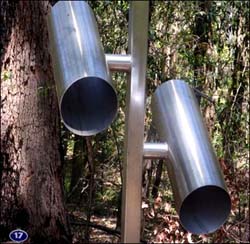
Bridie has successfully separated the foreground from the background whilst retaining some focus to the background. Achieved by a medium fstop and arranging some distance of camera from the subject.
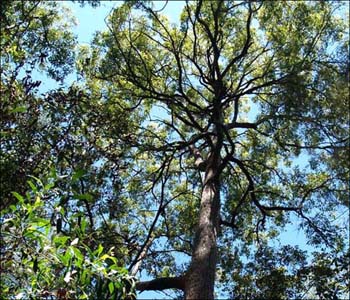
Julie set out to give overall sharpness to a diffifult subject with close proximity of the leaves in the lower left. Wide lens used with closed down fStop has achieved this effect.

Em has chosen a close-up of camera to foreground subject and a more open fStop setting to blur the background and retain absolute sharpness for the foreground. The number 11 stands out all the more with the blurred background and the strong side-lighting.
Everyone can be involved in our community workshops – irrespective of your global location.Please see details on my Workshop webpage
Enjoy your photography.
When autofocus fails - what causes it and how do you manage the problem - Digital Single Lens Reflex (DSLR) and SLR Cameras? (Part 3 - final)
Older SLR cameras: usually use a Passive autofocus system. This involves a tiny computer driven system which focuses the camera by analyzing the image seen through the lens. In order to work properly the system needs some contrast in the scene. If there is no detail, for example in a cloudless blue sky, then the camera can’t focus.
This autofocus system seems to work more efficiently where there is some vertical detail, which means that it might be possible to solve your focusing problems by turning your camera from a horizontal to a vertical position. By doing this you reorientate the sensor to the detail in the scene – you obviously can’t turn the scene on its side!
Newer cameras: have made things easier for you by building in more horizontal sensors.
Most Digital Single Lens Reflex (DSLR) Cameras now use an even more complex autofocus system, although this still works by analyzing contrast in the scene.
Because your camera needs to ‘see’ some detail or contrast, the autofocus will operate less efficiently under low light conditions. You can ‘help’ your camera by using the centre autofocus point (the most sensitive one) and by focusing on an area of the subject with the most contrast.
The sensor behind the autofocus point in the viewfinder of a DSLR is often wider than the small square that we use to position over the subject on which we want to focus.
If we focus on a small detail using an autofocus point but there is stronger detail just outside the point, the lens may focus on the stronger detail instead, or it may ‘hunt’ between the two. This problem is best solved by using manual focus.
Photographing very repetitive patterns may also cause a problem for your autofocus. If you can find something that is the same distance away from you as the patterns, you can focus on that by pressing the shutter release half way down, then recompose your original picture and take the shot. Manual focus is another option.
It is safe to say that autofocus works effortlessly well the vast majority of times we press the shutter release to focus on a scene!
Being able to solve the problem when it does occasionally fail is a matter of understanding why it’s not working, and what (if anything) we can do to correct the situation.
|
|
Restoration of
Family & Historical Photographs
Please contact me for further details.
If you prefer please send me a scan of your image for a free no obligation quotation. All services are covered by my guarantee of total satisfaction.
No restoration is too large. too difficult or too small.
My digital studio is also able to create PhotoArt imagey from your your photos by setting family members into different scenery and fantasy backgrounds. (please enquire and discuss your special needs)
You may view my price list here. Restoration tme beyond the basic prices is charged by the quarter hour.

Special considerations for Seniors Card holders and any flood damaged photographs.
You may view other examples of Photo Restoration on my Restoration pages
LATEST TIPs & FACT SHEETS for Digital Photographers
My TIPs and FActsheets give you advice on How to Use your Digital Camera. Gives you a kick-start to using your camera. These are shared FREE to our email Lifetime Network members.
Available TIPs:
TDP-0006 :
Flower Photography (in progress).
TIP-0005 :
How to use your digital camera.
TIP-0004 :
Photographing motor sports.
TIP-0003 :
Capturing movement with shutter speed.
TIP-0002 :
Commonsense colour management.
TIP-0001 :
Relationship of shutter speed and aperture.
Available FACT Sheets:
FS-1202 :
Downloading images from digital cameras.
FS-1201 :
Reduce image file size and modify image before sending as email attachment.
If you would like a copy of any of these TIPs or Factsheets or to receive my regular updates please send me an email and I will place your contact on my email network group.
Samples of TIPS can be found in previous Newsletters (see left column this Newsletter)
Community Group Photo Workshops
The next community Group Photo Workshop will be held in NOVEMBER. (further details to follow)
If you would like to attend or organise/ lead a future Community Group Phot Workshop please contact me.
Workshop & Seminar page |
Brisbane Seminars in the Library
Our popular monthly Seminars on BASIC digital photography are held on the third Thursday of every month at the Everton Park Library, BRISBANE
from 6-7.45pm.
The next seminar will be held on the
17th OCTOBER
REMINDER: in response to your many enquiries - yes - there will be a Seminar in December this year.
Monthly Seminars include discussions on digital photography, Digital Photography TIPs, and general discussion. ALL welcome
These Seminars are FREE and are part of my studio community program with the BCC Everton Park Library.
Bookings are essential
Please call the Everton Park Library on
07 3403 7400
to reserve your place.
|
Local Photographers' Email Network
You can be a member of my email network and receive these Newsletters each month and get regular advice of library seminars and discussion groups.
Contact me to get your name on the list (FREE with no obligations) and receive my regular TIPs For Digital Photographers.
FREE -Photography BASIC NOTES
If you would like a FREE copy of my Basic notes please email request with Subject "Basic Notes".
See details
|
|